
EasySoldering
Open a board file and get an interactive diagnostic map with every component, pin, net, and test point. A cognitive engine with 50+ analysis modules guides you from symptom to root cause, step by step.
✓ 14-day money-back guarantee · Pay once, no subscription · Works offline
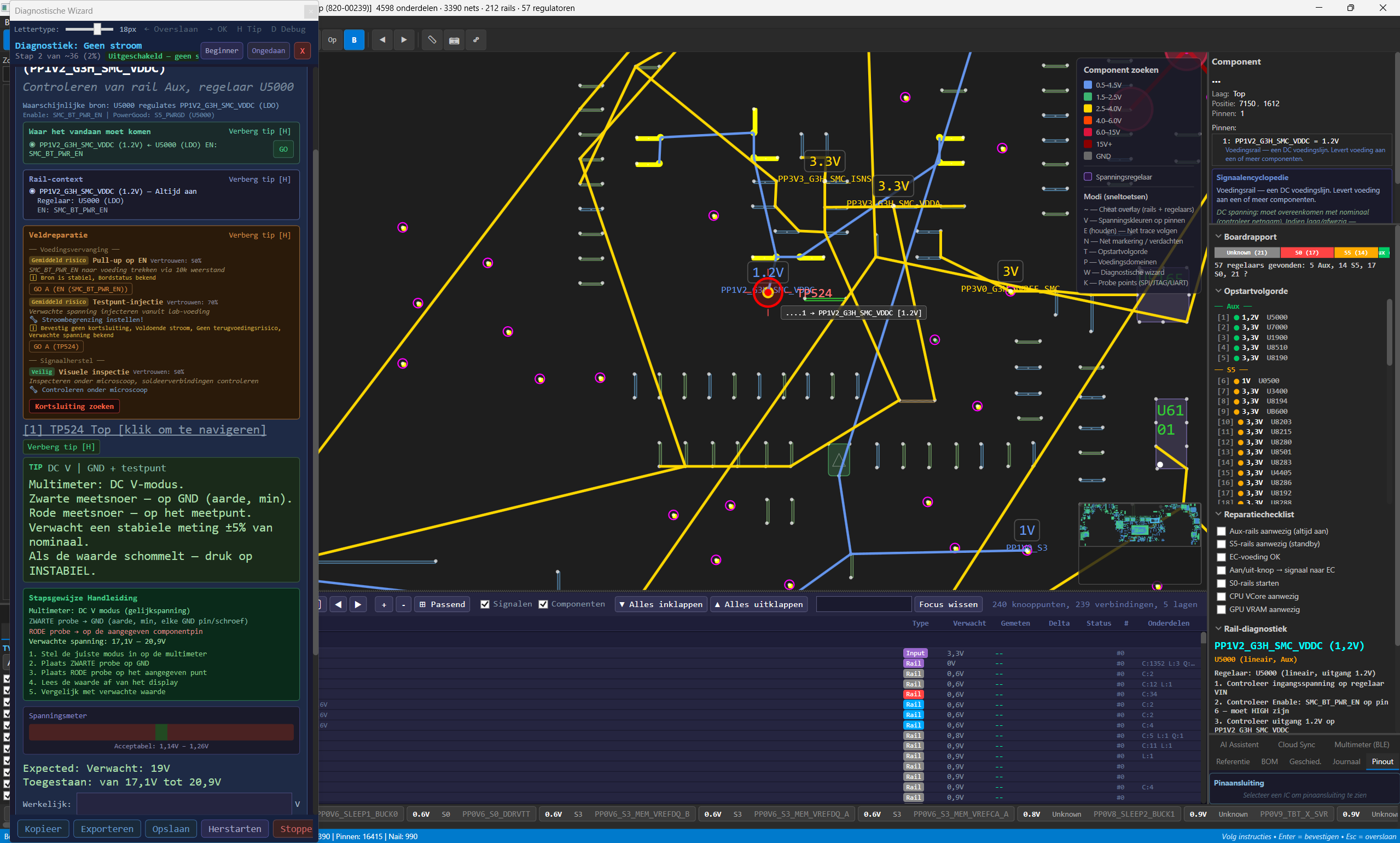
Key Capabilities
Signal Encyclopedia
Searchable reference for every signal type on modern boards. Auto-detects signals in your loaded board file and links them to detailed descriptions, expected voltages, and diagnostic tips.
Power Tree
Expandable hierarchy of regulators, rails, and load components. Visual indicators for rail health, voltage status, and startup sequence. Supports Buck, Boost, LDO, and SEPIC topologies.
Repair Plan Builder
Create structured repair plans with prioritized steps, component lists, and time estimates. Export plans as part of your PDF report or share with your team.
27 Board Manufacturers
Automatic manufacturer detection: Apple, Lenovo, HP, Dell, ASUS, Acer, MSI, Gigabyte, Samsung, Huawei, and 17 more. Manufacturer-aware diagnostic strategies via corpus-based priors.
ATX Desktop Support
Full support for ATX desktop motherboard diagnostics. Power supply sequencing, VRM analysis, CPU socket mapping, and PCIe slot testing for desktop repair workflows.
In-App Auto-Update
Automatic update checks with one-click install. Never miss a new version. Seamless background download with progress indicator and changelog preview.
Board File Support
EasySoldering reads the formats repair professionals actually use, including encrypted and proprietary files. No conversion, no third-party tools.
12 Diagnostic Formats
BRD, BRD2, BDV, FZ, GR, GenCAD, FAZ, TVW, BVR, BVR3, PCB, ASC. The formats used by BoardView and diagnostic tools worldwide.
Auto-Decryption
Protected and encrypted board files are decrypted automatically on import. Just open the file and EasySoldering handles the rest.
Schematic Integration
Built-in PDF and PNG schematic viewer with OCR indexing. Search for component references directly inside the schematic.
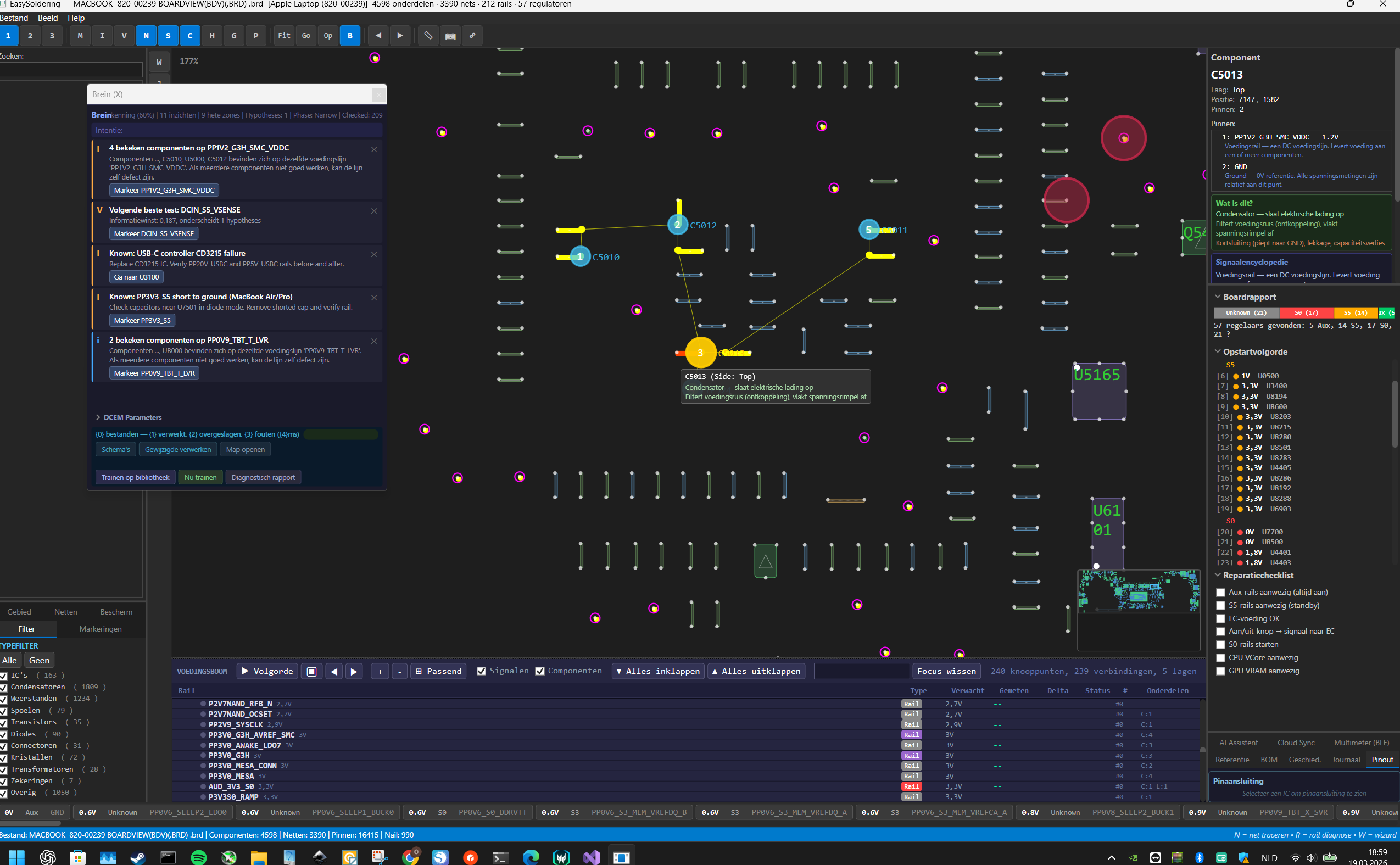
Cognitive Diagnostic Engine
DCEM: Diagnostic Cognitive Engine Model. Not pattern matching. Five cognitive levels with 50+ specialized analysis modules.
Level 1: Observation. Tracks your actions, collects anomalies from all sources, anticipates diagnostic intent.
Level 2: Hypotheses. Evidence-based fault hypotheses with confidence scoring. Causal analysis separates root causes from symptoms. VOI planner suggests optimal next measurement.
Level 3: Learning. Extracts diagnostic rules from past repairs, trains strategies, discovers patterns across your board database.
Level 4: Experience. Matches current faults against similar past cases. Evaluates diagnostic session quality.
Level 5: Metacognition. Monitors strategy effectiveness, calibrates confidence, adapts approach in real time.
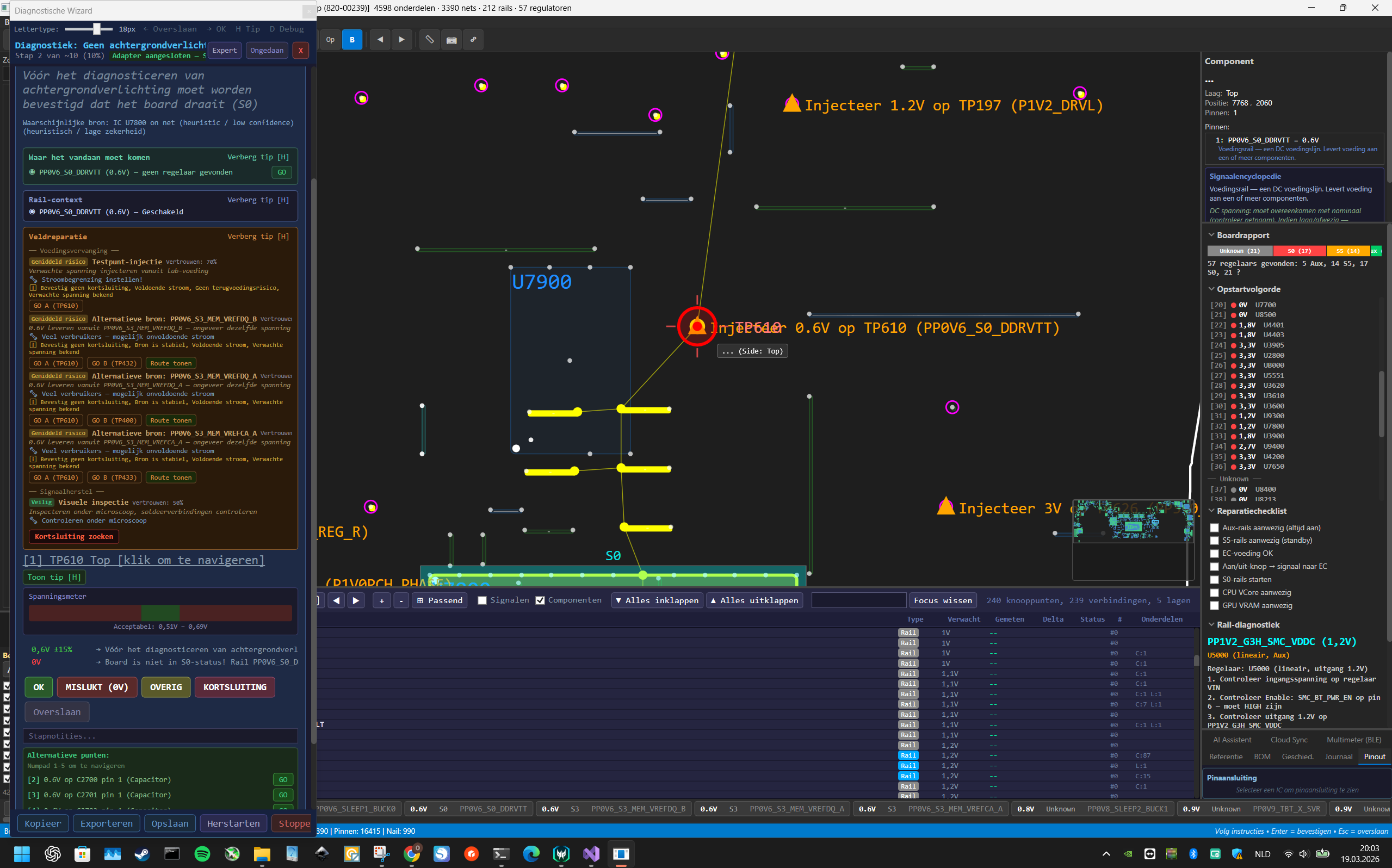
Power & Component Analysis
Power Tree
TreeListView with expandable regulator hierarchy: Buck, Boost, LDO, SEPIC. Input/output/enable/feedback mapping, startup sequence detection, and rail health scoring with visual indicators.
IC Intelligence
170+ IC patterns for controllers, interfaces, and regulators. Automatic function detection via connected nets. Pinout mapping with signal classification.
Protection Chains
Auto-detection of protection chains: fuses, MOSFETs, inductors, diodes. Short circuit localization with bridge planning. Danger zone marking for technician safety.
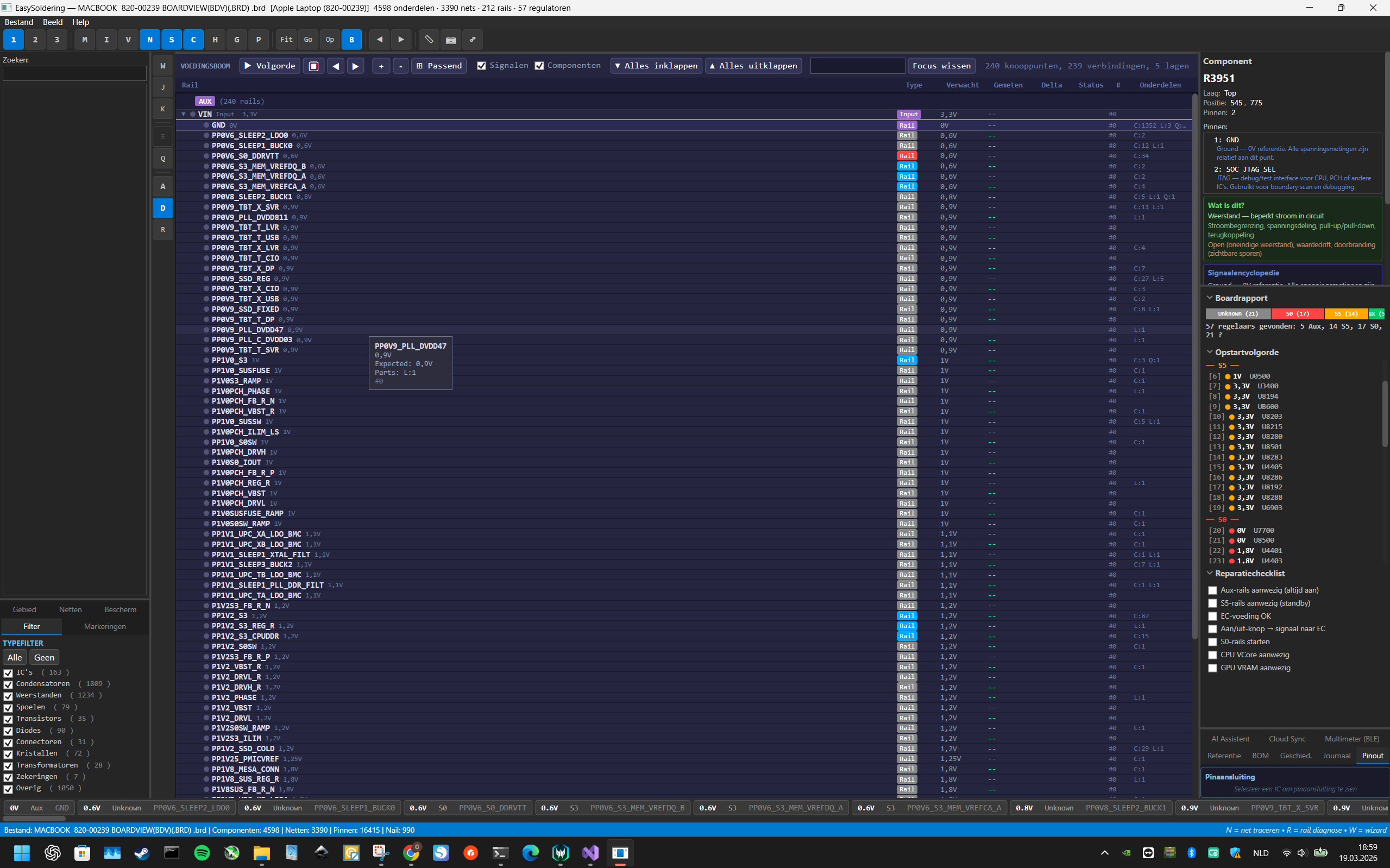
Guided Diagnostic Wizard
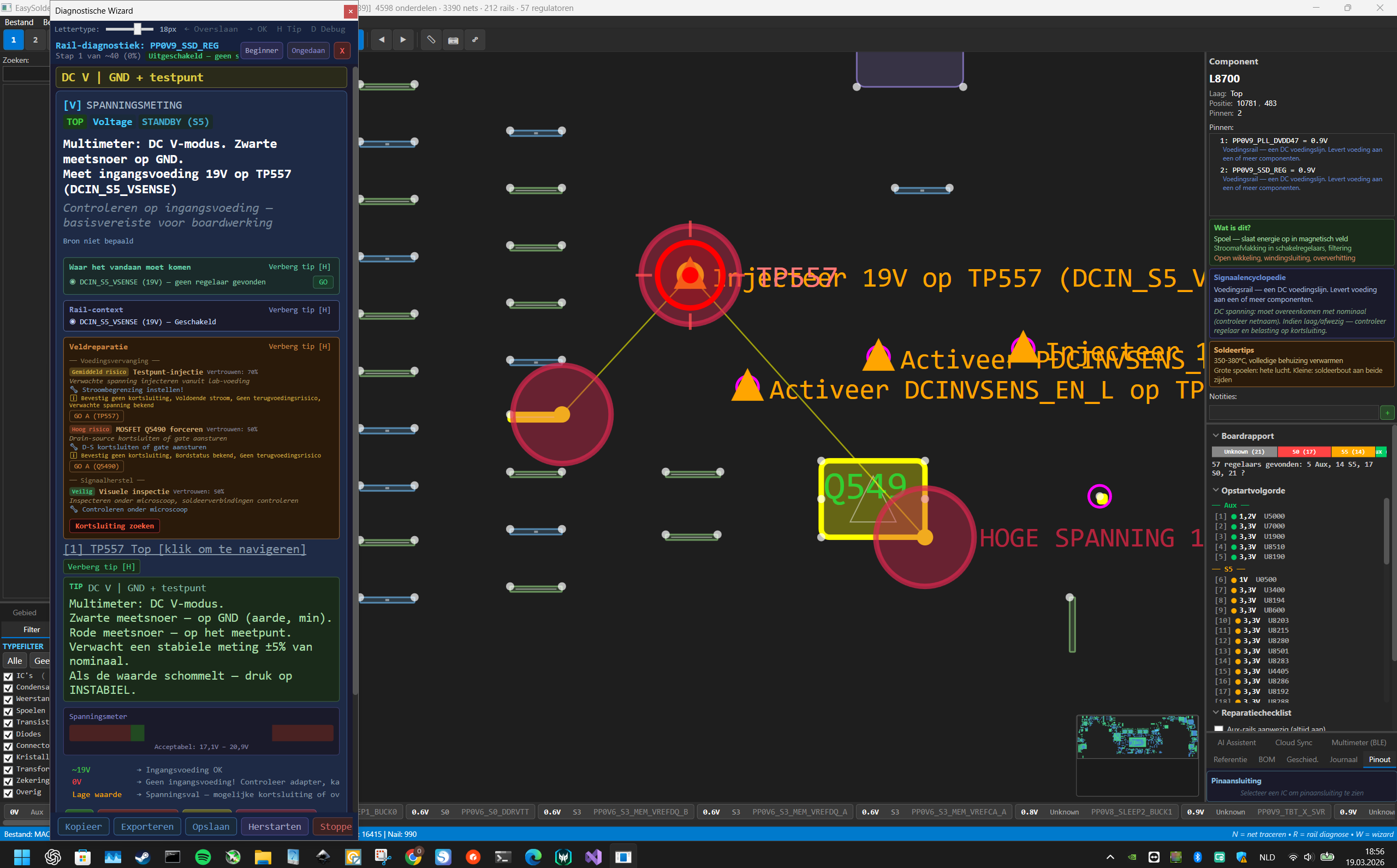
Three modes, one goal. The wizard adapts step sequence based on your measurement results. No rigid scripts.
Beginner
Maximum explanations at every step. Ideal for technicians learning board-level repair or working with unfamiliar boards.
Standard
Balanced detail and speed. The default for daily diagnostic work: enough guidance without slowing you down.
Expert
Manual rail selection, hypothesis editing, full control. For experienced engineers who want to drive the diagnostic flow.
Measurement & Collaboration
BLE Multimeter & Test Points
Connect your Bluetooth multimeter for live readings on the board. Automatic test point ranking, measurement journal with timestamps. Debug interface detection: SPI, JTAG, SWD, UART, I2C.
Golden Board & Dual Board
Compare a known-good reference board against a defective one. Dual Board mode for synchronized side-by-side navigation. Spot differences instantly.
Cloud Sync
Sync diagnostic sessions across devices. Automatic cloud backup of your board database, repair history, and settings. Work on any machine with your full diagnostic library.
Advanced Tools
Thermal Camera Overlay
Import thermal images and overlay them on the board schematic. Calibrate temperature mapping to pinpoint hot spots and correlate them with circuit analysis.
AI Assistant (BYOK)
Optional AI-powered diagnostic assistant. Bring your own OpenAI or Anthropic API key for natural-language fault analysis and repair suggestions. Works alongside the cognitive engine.
Projector & Nexar Lookup
Projector mode for full-screen board display during physical repair. Built-in Nexar component search by MPN for datasheets, pricing, and availability.
Professional PDF Reports
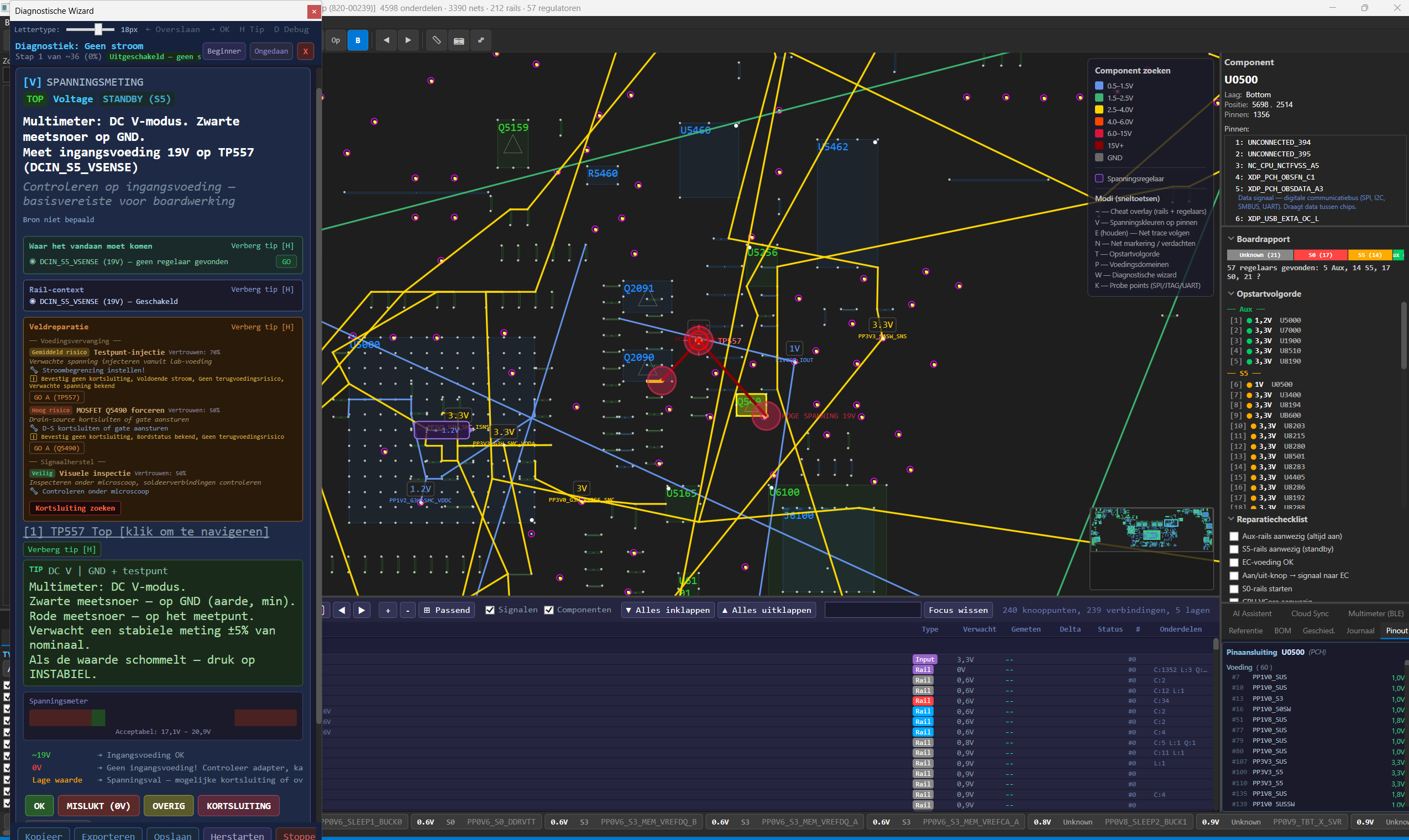
Generate a clear PDF report of your diagnostic session with one click. Ready for clients, QA documentation, or your own archive.
Technical Specifications
| Version | 2.1.0 |
| Platform | Windows 10 / 11 (64-bit) |
| Runtime | .NET 8 (bundled) |
| Size | ~20 MB (portable ZIP) |
| Rendering | 9-layer WPF hardware-accelerated engine |
| Manufacturers | 27 recognized (Apple, Lenovo, HP, Dell, ASUS, MSI, Gigabyte, Samsung, Huawei, and more) |
| Network | License check on launch + every 30 min. Core diagnostics work offline. AI Assistant and Nexar require internet. |
| Languages | English, Nederlands, Ukrainian |
Who It Is For
Repair Technicians
Smartphones, laptops, desktops, game consoles. If it has a PCB, EasySoldering helps you diagnose and fix it faster.
Service Centers
Standardize diagnostics across your team. Professional reports for every repair. Train new technicians with the guided wizard.
Engineers & Education
Electronics engineers, field service teams, and educational institutions. Learn board-level repair with intelligent guidance.