
EasyMigration
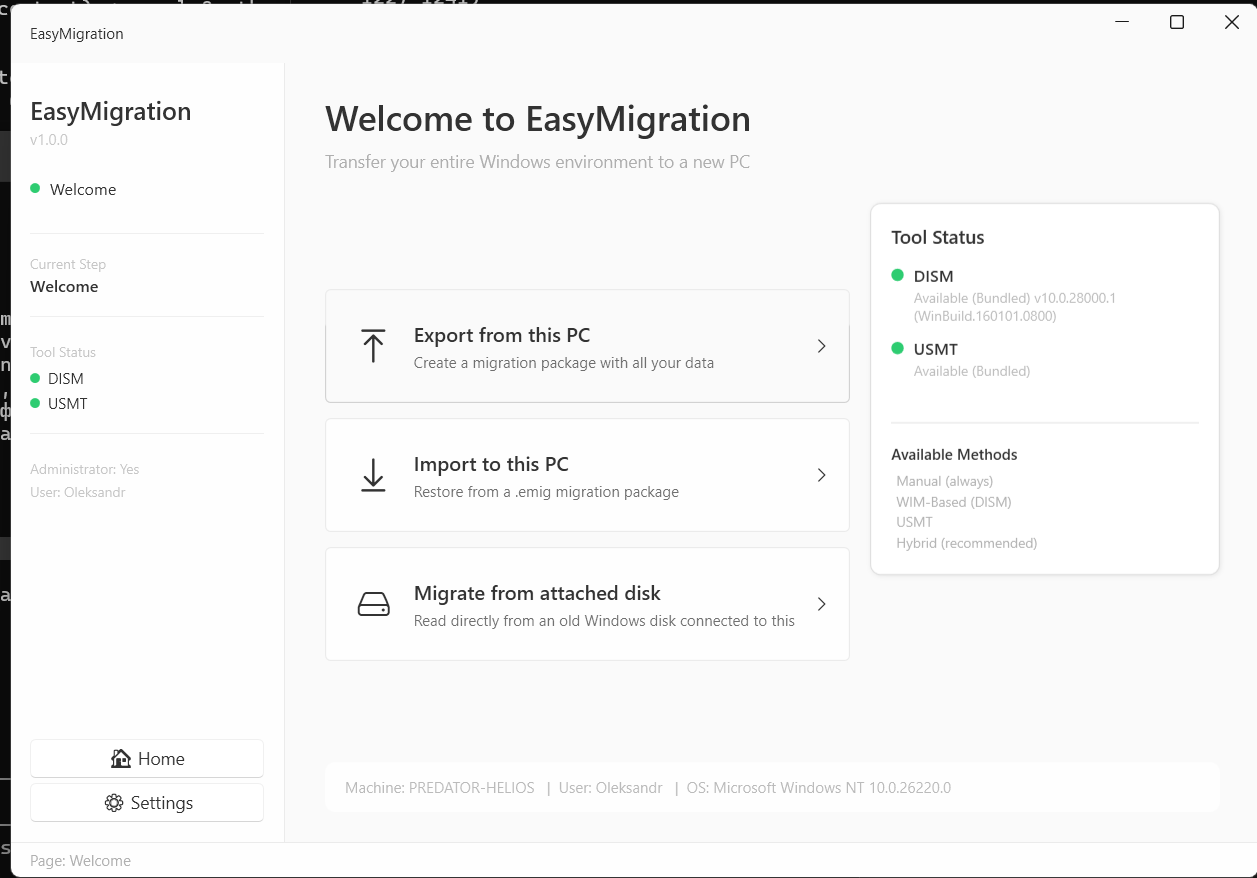
Move everything from your old PC to a new one. Applications, files, settings, user profiles. No reinstalling, no manual copying. One tool, unlimited migrations.
✓ 14-day money-back guarantee · Pay once, no subscription · Account-based — login from any PC
Why EasyMigration
Other migration tools charge per PC. EasyMigration gives you unlimited migrations for the duration of your plan. Perfect for IT professionals, service centers, and anyone managing multiple machines.
Full PC Transfer
Applications, user profiles, documents, desktop layout, browser data, email accounts, Wi-Fi passwords, and system settings. Everything moves to the new PC exactly as it was.
Smart App Detection
Automatically detects installed applications, their registry entries, and dependencies. Transfers complete application state including licenses, plugins, and custom settings.
Zero Data Loss
Integrity verification at every step. SHA-256 checksums for all transferred files. Detailed transfer log with pass/fail status for every item. Nothing gets lost or corrupted.
Fast Transfers
Direct PC-to-PC over your local network or USB 3.0. Multi-threaded transfer engine with compression. A typical 200 GB migration completes in under 30 minutes on gigabit LAN.
Multi-User Support
Transfer all user profiles from one PC at once, or select specific users. Domain and local accounts. Each profile lands on the new PC with its own files, settings, and desktop.
Detailed Reports
Full migration report: transferred apps, files, settings, errors, and warnings. Export as PDF for client documentation or compliance records.
Dead Windows Recovery
Windows won’t boot? Connect the drive as a secondary disk and EasyMigration will recover everything from the old Windows installation. No working OS required on the source drive.
What Gets Recovered
- Documents, Desktop, Downloads, Pictures, Videos, Music
- Browser profiles (Chrome, Edge, Firefox, Opera, Brave, Vivaldi)
- Email data (Outlook PST/OST, Thunderbird)
- WiFi network profiles & passwords
- SSH keys, GPG keys, Git config
- Windows product keys & software licenses
- Game saves (Steam, Minecraft, My Games)
- VS Code settings, JetBrains IDE configs
- VPN configurations, hosts file entries
- Wallpaper, fonts, Sticky Notes, Outlook signatures
How It Works
1. Connect your old drive (internal SATA, USB enclosure, or dock).
2. Select “Recover from dead Windows” in EasyMigration.
3. Choose the disk and review what was found.
4. One click to restore everything to your current PC.
5. An HTML recovery report opens automatically on your Desktop with a full summary and verification checklist.
Offline Intelligence
EasyMigration analyzes the dead disk deeper than any other tool:
- Offline DPAPI decryption — browser passwords without a running Windows
- Firefox passwords decrypted instantly (no Windows password needed)
- Program usage ranking — see which apps were used daily vs bloatware
- Recycle Bin recovery with original filenames
- Cloud account detection — OneDrive, Dropbox, Google Drive emails
- RDP connection history, PowerShell history, recent files
- Winget package matching — auto-reinstall programs with one command
30-Step Collection Pipeline
Our dead disk recovery engine runs 30 specialized collection steps covering every category of user data. Each step is independent — if one fails, the rest continue.
From browser history to WiFi profiles, from SSH keys to Sticky Notes, from Event Logs to USB device history — nothing is left behind.
No other migration tool offers this level of offline data recovery.
How It Works
1. Scan
Install EasyMigration on both PCs. The source PC is scanned for applications, files, and settings. Review what will be transferred and exclude anything you don’t need.
2. Connect
Both PCs discover each other automatically on the same network. Or connect directly with a USB cable. No router configuration, no port forwarding, no cloud upload.
3. Transfer
One click to start. Real-time progress with estimated time remaining. The destination PC is ready to use immediately after transfer completes. No reboot required for most items.
What Gets Transferred
Applications
Installed programs with their settings, registry keys, file associations, and plugins. Microsoft Office, Adobe, Chrome, Firefox, Outlook, development tools, and more.
Files & Folders
Documents, pictures, music, videos, downloads, desktop files. Custom folder locations are preserved. Large file support with no size limits.
System Settings
Wallpaper, taskbar layout, Start menu pins, default apps, printer configurations, mapped network drives, Wi-Fi passwords, power plans, and accessibility settings.
Transfer Methods
Local Network
Both PCs on the same Wi-Fi or Ethernet. Automatic discovery, encrypted transfer. Fastest option with gigabit LAN. No internet required.
USB Cable
Direct PC-to-PC USB 3.0 transfer cable. Plug in, detect, transfer. Works without any network. Ideal for isolated or secure environments.
External Drive
Create a migration image on an external HDD/SSD or USB drive. Carry it to the new PC and restore. Perfect when PCs are in different locations.
Smart Migration
MigrationBrain analyzes your system before migration starts. It scores every file by importance, detects sensitive data, predicts transfer time, and recommends the optimal strategy.
File Scoring
Every file scored Critical, High, Medium, or Low. SSH keys and documents get top priority. Caches and temp files are auto-skipped. You decide what matters.
Sensitive Data Detection
Scans for SSH keys, password databases, .env files, certificates, API keys, and crypto wallets. Warns you before migration so nothing gets lost or exposed.
Pause & Resume
Pause migration at any time. Current file completes, then waits. Resume continues exactly where you left off. No data loss, no restart from zero.
Technical Specifications
| Version | 2.5.1 |
| Platform | Windows 10 / 11 (64-bit) |
| Runtime | .NET 8 (bundled) |
| Size | ~93 MB (portable executable) |
| Authentication | Account-based (email + password) |
| Concurrent Use | 1 instance (all plans) |
| Network | Required (login + session verification) |
| Languages | English, Nederlands |
Who It Is For
IT Service Providers
Migrate dozens of client PCs per month with a single plan. No per-seat licensing. Your margins stay healthy regardless of volume.
Businesses
Rolling out new hardware across the office? Migrate every workstation without buying a license for each one. One plan covers the entire refresh cycle.
Home Users
Got a new laptop? Move everything from your old one in 30 minutes. No technical knowledge required. The monthly plan is all you need.
Pricing
Unlimited migrations for the duration of your plan. No per-PC charges, no transfer limits.
Monthly
per month
- Unlimited migrations
- Dead disk recovery
- All 50+ collectors
- Email support
Semi-Annual
EUR 75/month — save 25%
- Everything in Monthly
- Priority support
- 6 months access
- Best for IT service providers
Yearly
EUR 62/month — save 37%
- Everything in Semi-Annual
- 12 months access
- Hardware refresh coverage
- Best for businesses